
Twitter/X Auto Unfollow
- Included on every paid plan
- 300 actions per day
- Runs in the cloud
Unfollow rules
● ActiveTweeksocial's Twitter/X auto unfollow finds the accounts you follow that do not follow you back and unfollows them automatically, a set number each day, until your following list is back in shape. It runs in the cloud while your laptop is off, and it is included in every plan, from $29 a month with a 7-day free trial.
Aggressive following works right up until your profile says 340 followers, 4,900 following. At that point the ratio itself becomes the reason people do not follow you. It reads as desperate, and no amount of good writing fixes a bad first impression.
Tweeksocial's auto unfollow fixes the ratio the same way you would by hand, minus the RSI. It identifies non-followers, dormant accounts and profiles that no longer match your niche, then unfollows them gradually across days — while protecting everyone on your whitelist.
The side effect nobody mentions: your timeline gets dramatically better. Cutting 2,000 accounts you never read means the ones you do read finally show up.
Updated
Twitter/X Auto Unfollow at a glance
- What it unfollows
- Accounts you follow that do not follow you back, once the waiting period you set has passed
- Not following back list
- Every account that does not follow you back, in one list you can review and unfollow from
- Daily pace
- You choose how many a day; every plan caps actions at 300 a day per account
- Where it runs
- In the cloud, a few unfollows at a time, while your laptop is off
- Price
- Included in every plan, from $29/month; 30% off when paid yearly
- Try it free
- A 7-day free trial on the Free plan: every feature, up to 10 messages a day, no card
Auto Unfollow: the platform's numbers and ours
Where X publishes a figure that affects this feature, it is shown here next to what Tweeksocial does, with a link to the source.
| Topic | What X says or does | What Tweeksocial does | Source |
|---|---|---|---|
| Accounts you can follow | After 5,000 following, further follows depend on an account-specific ratio of followers to following | Auto unfollow brings the ratio back into shape a few accounts a day | X limits page |
| Notification when you unfollow | None. X does not tell the person, though they can see the follow is gone if they look at your profile | Removals are spread through the day, and every one is logged and reversible | Does X tell someone when you unfollow? |
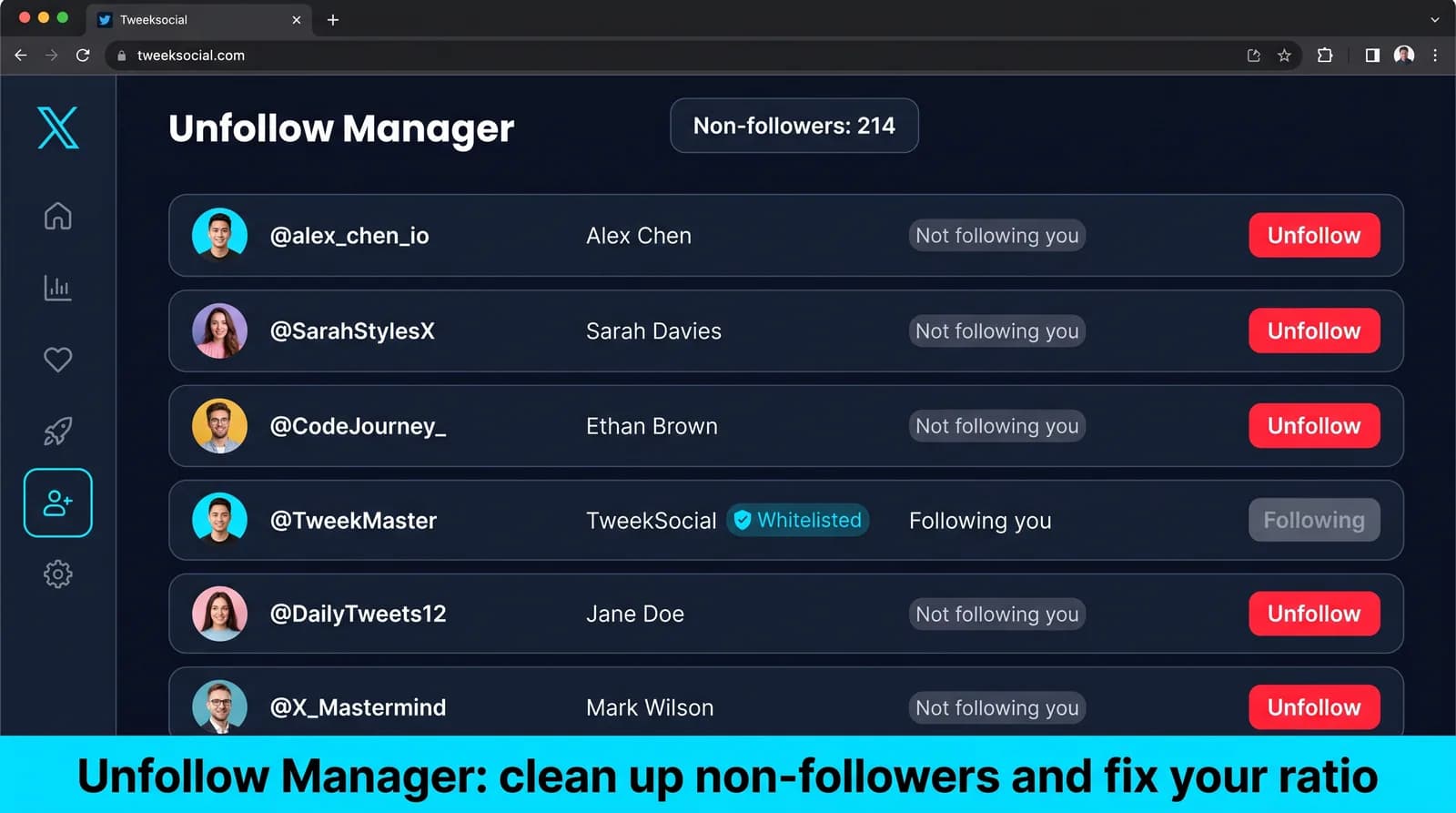
Everything included in Twitter/X Auto Unfollow
Unfollow non-followers automatically
Set a grace period — say seven days — and anyone who has not followed back by then is queued for removal. No spreadsheets, no manual comparing.
Clear out dormant accounts
Filter by last tweet date and remove profiles that have not posted in 90, 180 or 365 days. Ghost accounts do not engage and they quietly dilute your reach.
Whitelist the people who matter
Friends, clients, mentors, competitors you monitor — add them to the protected list and they are never touched, even if they never follow you back.
Fix your follower-to-following ratio
Set a target ratio and let the tool work toward it steadily. A profile that shows more followers than following reads as credible before anyone reads a single word.
Gradual, randomized removal
Unfollows are spread across the day with natural gaps rather than dumped in one burst, which keeps your account well clear of rate-limit trouble.
Full audit trail
Every unfollow is logged with a reason and a timestamp, so you can always answer "why did I stop following them?" and re-follow with one click if it was a mistake.
How to auto unfollow on Twitter/X
From a cold start, most people have this running in under five minutes. The longest part is deciding who you actually want to reach.
Set it up now- 1
Connect and scan
Tweeksocial builds a complete picture of who you follow, who follows you back, and when each account last posted.
- 2
Choose your rules
Non-followers after N days, inactive for N days, missing keyword in bio, or any combination. Preview exactly how many accounts each rule affects before you commit.
- 3
Protect your people
Import or hand-pick your whitelist. Mutuals can be protected automatically with a single toggle.
- 4
Run at a safe pace
Pick a daily unfollow limit between 50 and 200. The queue works down steadily and pauses itself if anything looks unusual.
- 5
Keep it running quietly
Leave the rules on permanently and your following list stays clean forever without you thinking about it again.
What Twitter auto unfollow actually does
Twitter auto unfollow removes follows on your behalf, based on rules you set, at a pace you control. The unfollowing itself is trivial — it is one button. What you are actually buying is the decision layer: who qualifies, how long they get first, and who is permanently exempt.
A reasonable setup looks like this. Anyone who has not followed you back within a grace period of a week or two is queued. Anyone who has not posted in six months is queued. Anyone on your whitelist is never queued, no matter what. The queue is then worked through gradually over days rather than emptied in one sitting.
Worth clearing up early: Twitter auto unfollow and X auto unfollow are the same thing. The platform renamed itself, the follow button did not move, and every limit and pattern described here applies identically whichever name you searched for.
Why your follower-to-following ratio matters more than you think
Open any profile and you make a judgment in about two seconds, mostly without noticing. An account with 340 followers and 4,900 following reads as someone chasing attention. An account with 3,000 followers and 400 following reads as someone worth reading. Same person, same writing, completely different first impression.
As a rough guide: above 1:1 signals a real audience. Above 2:1 starts reading as authority. Below 1:2 — twice as many following as followers — actively costs you follow-backs from people who would otherwise have said yes.
This is the part that compounds, and the part people miss. A poor ratio does not just look bad; it suppresses the follow-back rate of every campaign you run afterwards. You can do everything else right — perfect targeting, a great bio, consistent posting — and still convert badly because the numbers at the top of your profile argue against you before anyone reads a word.
Who to unfollow, in priority order
Start with non-followers past their grace period. This is the largest group and the one with the clearest logic: they saw the notification, they looked or they did not, and they decided not to follow back. Keeping them costs you ratio and gains you nothing.
Then dormant accounts. Anyone who has not posted in six months is not reading your timeline either. They are dead weight in both directions, and removing them improves what you actually see when you open the app.
Then the off-niche accounts you followed in your first month, before you knew what you were writing about. Most people have a few hundred of these and have not thought about them in years.
What stays: people who follow you back, people you genuinely read, customers, and anyone whose relationship matters more than the number next to it. The point of auto unfollow is removing accounts you would have removed by hand if you had three spare hours — not emptying the list.
The grace period is the most important setting
If you take one thing from this page, take this: do not unfollow people the day after you followed them.
Rapid follow-then-unfollow cycling is the most heavily policed pattern on the platform, far more than raw volume. It is trivially detectable, it has no innocent explanation, and it is the single most common reason accounts running automation get restricted.
Set a grace period of at least seven days. Fourteen is better. Real people do not check their notifications hourly — they open the app on a Tuesday evening, see that four accounts followed them last week, and decide then. A one-day grace period does not measure whether someone wanted to follow you back. It measures whether they happened to be online.
The longer window costs you nothing except patience, and it converts a pattern that looks automated into one that looks like someone tidying up.
Safe auto unfollow limits on X
X does not publish an unfollow limit, and the numbers circulating online are mostly guesswork repeated until it sounds official. What is consistently observable is that bursts cause problems long before totals do.
By account age, a conservative starting point: under three months, 20 to 30 unfollows a day. Three to twelve months, 50 to 80. Established accounts with consistent history run 100 to 150 comfortably. Tweeksocial caps every plan at 300 actions per day per account, and we would rather you sat well under that.
Spread whatever number you choose across your active hours with randomized gaps and overnight quiet hours. Forty unfollows scattered between nine and six is indistinguishable from a person having a clear-out. Forty unfollows in three minutes at 4am is not.
One more rule that matters as much as the daily number: do not follow and unfollow in the same session. Separate the two activities, ideally into different parts of the day.
Mass unfollow versus gradual cleanup
Almost everyone arriving at an unfollow tool wants the same thing on day one: remove all 3,400 non-followers immediately and start clean. It is an understandable impulse and it is the fastest route to a restricted account.
A profile that sheds thousands of follows in an afternoon has done something no human does. Even if the total is technically within limits, the shape of the activity is the problem — a flat line for two years followed by a cliff.
Spread it instead. At 60 a day, 3,400 accounts takes under two months and never once looks unusual. That feels slow when you start and irrelevant by the time it finishes, because the ratio improves steadily throughout rather than all at once.
If you genuinely need a faster clean-up, raise the daily number gradually across two weeks instead of starting high. The ramp matters more than the ceiling.
Unfollow manager, mass unfollow, bulk unfollow, cleanup tool
These names describe one job with different emphasis, and the differences are worth knowing because they imply different settings.
An unfollow manager, or following manager, is the ongoing version: rules that run continuously, removing non-followers after a grace period as they accumulate. This is the mode most accounts should use.
Mass unfollow and bulk unfollow are the volume framing, usually meaning a backlog cleared in one pass. Tweeksocial will do it, but spread across days — the section above on gradual cleanup explains why clearing thousands in an afternoon is the single fastest way to get an account restricted.
A cleanup tool usually means the one-off case: you inherited a following list of four thousand accounts and want it sane again. Same mechanics, finite job.
Unfollowing inactive Twitter users is a filter rather than a separate tool — accounts with no posts in six months, removed on the same schedule as non-followers.
Whichever term you arrived with, the settings that matter are the same: a grace period of at least a week, a conservative daily number, and a whitelist built before the first run.
Who you should never auto unfollow
Build the whitelist before you run the first campaign, not after you have removed someone you needed.
The obvious entries: customers, clients, partners, investors, friends, and anyone you have an actual relationship with. Then the less obvious ones — journalists and podcasters in your field, people whose writing you rely on, and accounts you follow for research rather than reciprocity. None of these people owe you a follow back, and unfollowing them to improve a ratio is a bad trade.
Mutuals are protected automatically by any sane rule set, because they followed you back. The whitelist exists for the people who never will and should stay anyway.
Treat it as permanent. A whitelist you have to rebuild every campaign is a whitelist that will eventually miss someone.
Does unfollowing hurt your engagement or reach?
No, and the arithmetic is worth spelling out because the worry is so common.
Engagement rate is engagement measured against your follower count. Unfollowing changes who you follow, not who follows you, so the denominator does not move. Your existing followers do not get a notification and have no idea it happened.
What does change is your own timeline, usually for the better. Cutting 2,000 accounts you never read means the people you actually care about stop being buried. Several users have told us the timeline improvement was the part they noticed first, ahead of the ratio.
The one real risk is unfollowing someone who would have become a customer or a collaborator. That risk is managed with the whitelist and a sensible grace period, not by avoiding cleanup altogether.
The follow and unfollow cycle, done without getting restricted
Auto unfollow is one half of a loop. Run it in isolation and your following count falls; run it as part of a sequence and your account compounds.
The sequence that works: use auto follow to reach a tightly targeted audience at a conservative pace. Greet the people who follow back with a welcome DM while they still remember choosing you. Leave everyone else alone for a full grace period. Then let the Unfollow Manager clear the ones who never reciprocated, gradually, while the next batch of targeting runs.
Each step is unremarkable on its own, which is precisely why the combination is durable. Nothing here depends on a loophole or an exploit. It is the same set of actions an extremely diligent person would take by hand, executed at a pace that person could plausibly sustain.
Set the rules once, keep the whitelist honest, and check the numbers monthly rather than daily. The ratio fixes itself from there.
Rules worth running permanently
Once the backlog is cleared, three rules keep a growing account tidy at a pace nobody notices.
Non-followers after 7 days, capped at 50 a day. Inactive accounts over 180 days, capped at 25 a day. And a whitelist, reviewed every quarter as relationships change.
That combination stops your following list drifting back into the state that sent you looking for an auto unfollow tool in the first place. For a one-off clear-out of a big backlog, mass unfollow covers how long it takes at each daily pace.
Step-by-step guides
- Mass unfollow on Twitter/XHow to bulk unfollow on a schedule, and how long a cleanup really takes.
- Unfollow non-followers on TwitterGrace periods, whitelists and daily limits, step by step.
- Unfollow all on Twitter/XClearing an entire following list without doing it in one go.
- Unfollow inactive Twitter accountsClearing dormant accounts to clean up your feed.
- Twitter follower-to-following ratioWhat a healthy ratio looks like and how to repair one.
- Chrome extension vs cloud unfollow toolWhich suits a one-off cleanup and which suits ongoing use.
- Twitter unfollower toolSee who unfollowed you and who does not follow you back.
- Help: setting your unfollow rulesConfiguring auto unfollow inside Tweeksocial.
- Twitter/X follow limit: the 5,000 cap explainedHow the limit works and what to unfollow first.
- Who does not follow me back on Twitter?Find the accounts to unfollow before you start.
- Does X tell someone when you unfollow them?What the other person can still see afterwards.
- Twitter auto unfollow settingsThe five settings that matter, with starting values for four situations.
- How long to wait before unfollowingChoosing a grace period of 3, 7 or 14 days for your audience.
- The Twitter unfollow whitelistSeven groups of accounts to protect before you clean up.
- Auto unfollow vs unfollowing by handTime, accuracy and control compared, with example arithmetic.
- Audit your following list in 30 minutesSample the list, sort it into five groups and start a safe clean-up.
Twitter/X Auto Unfollow is a good fit if you are…
It is not for everyone, and we would rather tell you that up front than take a month of your subscription before you work it out yourself.
- Accounts recovering from an aggressive follow phase
- Anyone whose ratio is hurting their credibility
- Creators who want a genuinely useful timeline
- Agencies standardizing hygiene across client accounts
How Auto Unfollow compares with other tools
Our comparisons use each vendor’s own published prices and features, and say where another tool fits better.
No, as long as the pace is reasonable. Unfollowing 3,000 accounts in an afternoon looks like automation abuse; unfollowing 100 a day for a month looks like housekeeping. Tweeksocial only supports the second pattern.
Whitelist them. Journalists, mentors, competitors and friends can all be permanently protected, individually or by importing a list, and the rules will skip them forever.
Under three months old, keep it to 20 to 30 a day. Three to twelve months, 50 to 80. Established accounts run 100 to 150 without trouble. Every Tweeksocial plan caps at 300 actions a day per account, and the pace matters more than the total — the same number spread across your active hours with randomized gaps is far safer than a burst, however modest the burst is.
Seven days at an absolute minimum, and fourteen is better. Rapid follow-then-unfollow cycling is the most heavily policed pattern on the platform. A short grace period does not measure whether someone wanted to follow you back, only whether they happened to be online — most people check their notifications weekly rather than hourly.
No. A profile that sheds thousands of follows in one afternoon has done something no real person does, and the shape of that activity is what causes restrictions rather than the total. At 60 a day, 3,400 accounts clears in under two months and never looks unusual at any point. Ramp the daily number up gradually rather than starting high.
Anything above 1:1 signals a real audience. Above 2:1 reads as authority. Below 1:2 — twice as many following as followers — actively costs you follow-backs, which is usually the moment people come looking for an auto unfollow tool.
Yes. Turn off the non-follower rule entirely and run only the inactivity filter. Plenty of users do exactly this to clean their timeline without touching real relationships.
It usually improves it. Engagement rate is measured against your followers, not the accounts you follow — and a cleaner timeline means you see and reply to relevant posts more often, which lifts reach.
Yes. Every removal is logged, and you can re-follow anyone from the history view with a single click.
Choose "not following back" as the rule, set how long to wait after following someone and how many to unfollow a day, and Tweeksocial works through the list automatically from the cloud.
X does not send a notification when you unfollow someone, though some third-party apps can tell people. At a gradual pace spread over weeks almost nobody notices, and anyone who genuinely matters can go on your whitelist.
Free Chrome extensions can handle a one-off cleanup, but they stop when you close the tab. Tweeksocial's auto unfollow runs in the cloud and is included in every plan from $29 a month, with a 7-day free trial.
The rest of the toolkit
Twitter/X Auto Unfollow works best alongside the other five. Every plan includes all of them, so there is nothing to upgrade to.
Twitter/X Auto Follow
Twitter and X auto follow that targets the right people: follow back new followers the same day, auto follow the followers of any account in your niche, and keep every action human-paced.
Learn moreTwitter Welcome DM
A Twitter welcome DM that greets every new follower with a message sounding like you wrote it — and fires the moment someone messages you. Automatically triggered, personalized with their name, and paced to read like a real person.
Learn moreTwitter New Followers DM
Automatically DM every new follower on Twitter (X) the moment they follow you — a personalized new followers DM that turns a silent follow into a real conversation, sent on a human-paced schedule.
Learn moreTwitter/X Mass DM Tool
Message your entire follower base — or an imported list — for a launch, a webinar or an offer, with personalization, pacing and delivery reporting built in.
Learn moreTwitter Unfollower Tool
See who unfollowed you on X and when, find everyone who does not follow you back, and unfollow them from the same list.
Learn morePut Auto Unfollow to work this week
Connect your X account, run one campaign at a conservative pace, and judge it on the follow-back and reply numbers you see during the trial. That is the only test that matters.